Publish to your CMS
The shortest path from a diagnosed Content Readiness gap to a live URL. Available on Growth and up. AnswerTrace drafts the artifact; you review and publish.
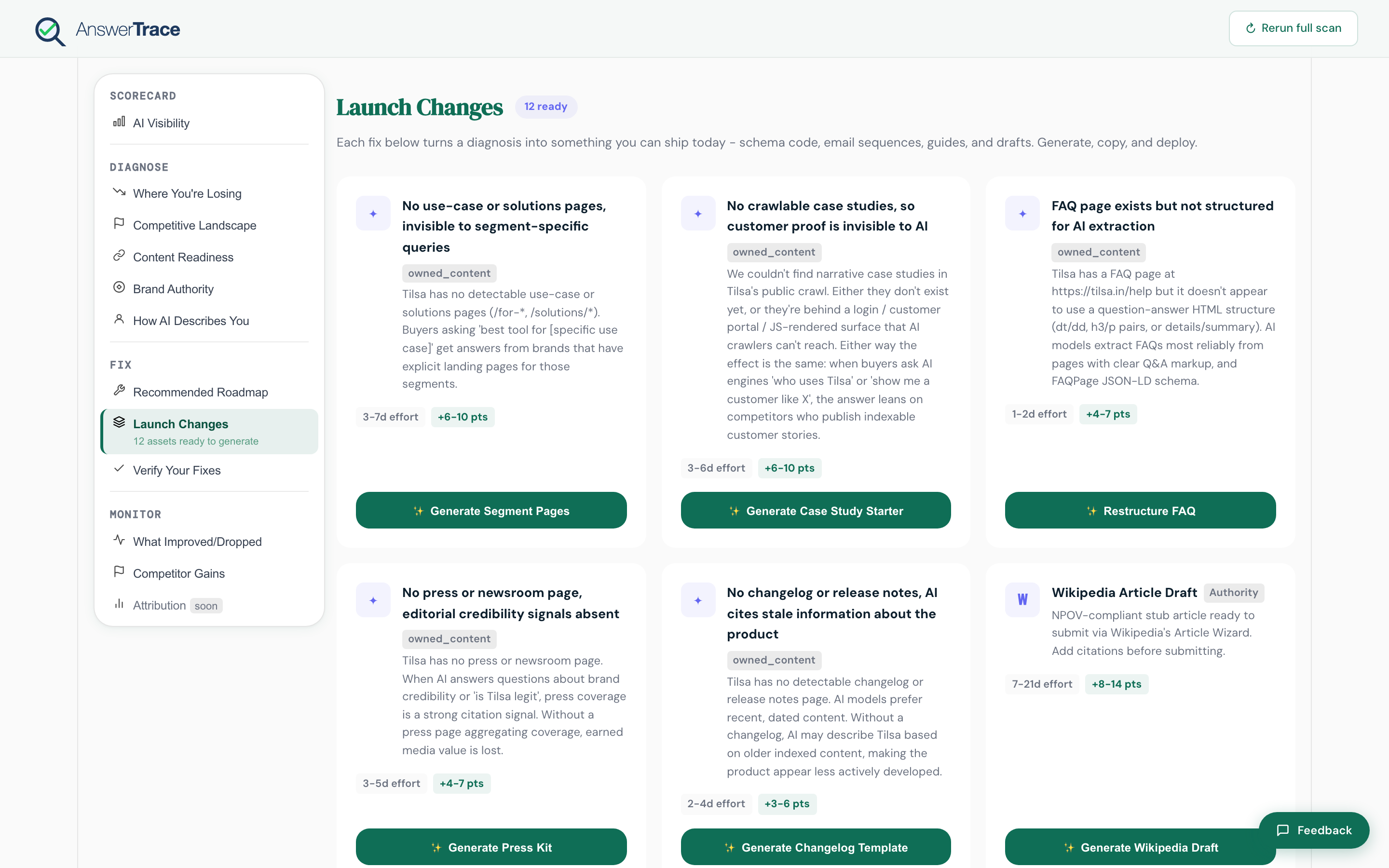
How it works
- Open your latest report
- Scroll to Recommended roadmap or Launch changes
- Pick a finding with a Generate artifact button
- AnswerTrace drafts the artifact for that specific rule. The shape varies by rule, but typically includes:
- A title and short summary
- A markdown body with H2/H3 hierarchy when the artifact is a page
- The relevant JSON-LD block when the artifact is structured data (
FAQPage,Organization,Product,Offer) - Per-rule extras (FAQ Q&A pairs, comparison page sections, glossary entries, case study outline)
- Hit View & copy to preview, or Publish to CMS to push it live as a draft
Supported destinations
| Destination | Connection method |
|---|---|
| WordPress | App password (you generate one in your WP admin), site URL |
| Webflow | Webflow API token, site ID, collection ID |
| Contentful | Personal access token, space ID, content type ID |
| GitHub PR | GitHub personal access token, repo and target branch. Opens a PR with the artifact as a new file |
| Shopify | No connection. You copy the page title, clean HTML and URL handle into Online Store > Pages |
| Copy / Download / MDX | Local export for paste-elsewhere flows |
Credentials are entered in the Publish to CMS modal on the report page, not in a global settings page. They aren’t persisted between sessions, so paste them each time. The Settings → Integrations page covers Slack alerts today; CMS persistence is on the roadmap.
Limits
| Plan | Articles per month |
|---|---|
| Free | None |
| Starter | None |
| Growth | 3 per month |
| Pro | Unlimited |
| Agency Standard | 3 per brand per month |
Unused quota does not roll over.
What gets shipped
When you hit Publish to CMS, AnswerTrace pushes the artifact to the destination as a draft:
- WordPress: creates a post or page as
draftstatus with a clean URL slug. Schema is injected on publish via the AnswerTrace WordPress plugin so it lands in the page head. - Webflow: creates a draft collection item in your target collection, with the page title, the page copy in the body field, and the page’s own slug. The breadcrumb structured data is not sent; add it in the page’s custom code if you want it.
- Contentful: creates a draft entry in your target content type. Same pattern as Webflow.
- GitHub PR: opens a pull request with the page as a new markdown file in the path you choose. Useful for static-site or MDX-based blogs. The breadcrumb structured data is in the pull request description, for your developer to add to the page head.
- Shopify: nothing is pushed. The drawer gives you the title, the page as clean HTML and the URL handle, with the steps to paste them into a new page in Online Store > Pages. Set it to hidden, read it, then make it visible.
Every destination gets the page itself: headings and paragraphs, never the labels the drawer shows while you read it.
You then log in, review, and publish on your own schedule.
What this means for you
The single biggest lever for AI visibility is the missing page. Most teams know what’s missing but never get around to writing it. This flow is the bridge from a diagnosis in Content readiness to a live URL in under an hour. Once it ships, watch the next What improved or dropped cycle for the lift.