What improved or dropped
The change feed that proves the lift. Available on Starter and up. Compares this scan to the prior one and surfaces everything that moved.
Why this is the most-used Track view
The score lift, the leaderboard climb, and the eventual attribution all answer “did it work?” at different latencies. This view answers fastest. It’s also where Slack alerts originate on Pro.
What we track
Every change between two consecutive scans is tagged into one of three tiers:
| Tier | Examples | Where it shows up |
|---|---|---|
| Tier 1 | Citation lost on a high-intent prompt, citation gained on a high-intent prompt, competitor newly cited on a high-intent prompt, competitor displacement (a rival took your #1), engine-wide score drop above the per-engine noise band | In-app feed, real-time Slack alert on Pro, recap email after each scan on Growth |
| Tier 2 | Lower-intent citation moves, position changes, score moves below the per-engine band, competitor entered or left a list | In-app feed and the recap email (shown there as a count) |
| Tier 3 | Background deltas | In-app feed only |
The per-engine noise bands for the engine-drop signal are ChatGPT 2 points, Google AIO 3, Claude 3, Perplexity 5. Below those thresholds, a score move is treated as run-to-run noise and not surfaced as a Tier 1 event.
How we filter noise
Two mechanisms keep the feed useful instead of noisy:
- Per-engine noise bands, the engine-drop thresholds above. Anything inside the band is treated as run-to-run variance.
- Persistence rule on Tier 1, an event only escalates after two consecutive scans agree on it. On Pro (weekly cadence) that’s about a week’s delay; on Starter and Growth (a scan every two weeks) it’s about two weeks.
The engine currently runs one call per prompt per scan; we don’t yet do per-prompt multi-run averaging. The persistence rule above is the primary noise filter.
What the card looks like
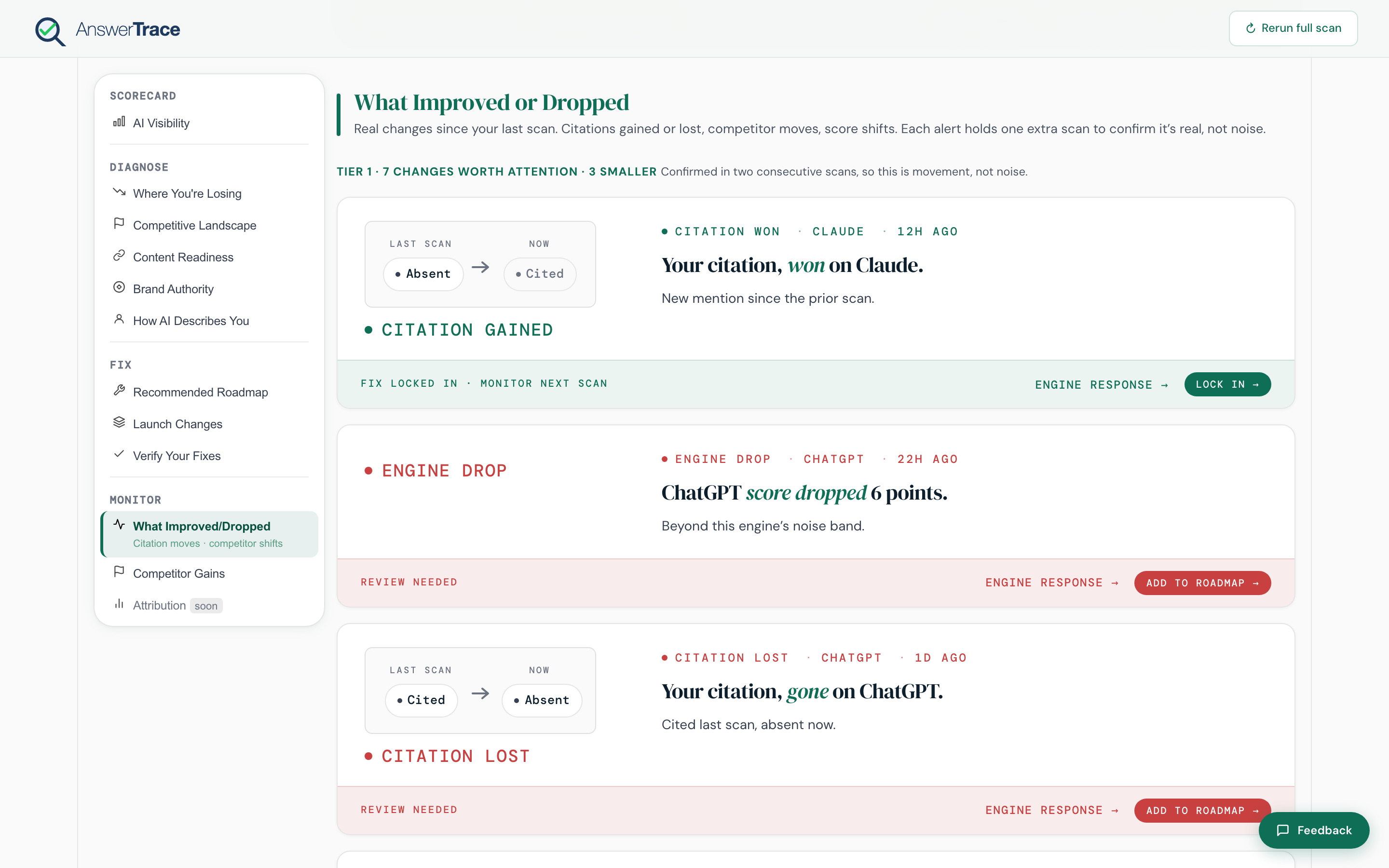
Each change card shows:
- A direction arrow, up or down
- The prompt or attribute that moved
- The engine where it moved
- A description of the change. Position moves read “From #N to #M”. Score moves read “score dropped N points”. Competitor events name the competitor and the displacement scope.
- Action chips: View prompt (open the answer), Engine response (open the raw model output), Add to roadmap (Tier 1), Track competitor (Tier 2, for competitor events)
Plan tiers
| Plan | What you see |
|---|---|
| Free | Locked teaser |
| Starter | Full in-app change feed |
| Growth | In-app feed + a recap email after each scan that finds a change (at the next 09:00 after the scan, in your workspace’s local time, defaults to Asia/Kolkata) |
| Pro | Same as Growth + real-time Slack alerts with quiet hours (22:00 to 07:00 workspace local time) |
What this means for you
The feed is how you close the loop without re-reading the full report after every scan. If you set up Slack alerts, you only open AnswerTrace when a Tier 1 event fires. The size-of-move on each card is the single best proof point that the work you shipped in Fix actually landed.